Lightroom VS Snapseed software has distinctive features to enhance your photos. Both of these applications have a large fan following in the photography world. However, there is a difference between the app’s features and its working capabilities. This article provides a detailed comparison of these apps so that users can make informed decisions based on their preferences.
The tools make photography easier and enhance creativity in professional photography. A huge variety of tutorials and articles about photo editing software are available. You might be concerned about which is best. However, this question depends on the program features and your editing requirements. Lightroom and Snapseed are the most prominent apps discussed in this article.
Before comparing Lightroom and Snapseed, briefly define the backgrounds of these apps that help in professional photography.
Adobe Lightroom
Lightroom is the top photo editing software and offers high-quality editing tools. It’s widely applied by the beginner as well as famous among professional photographers., Unlike other apps’ complicated tools, its features are user-friendly, and anyone can use it instantly without any complication.
The Lightroom editing process is simple and contributes to workflow consistency. It completes the work within a few clicks. It offers a simple, natural interface for photo editing that is an alternative to its older versions and has progressed more with the advancement of technology. Initially, it had only graphic designing and editing tools, but now it can organize and manage extensive data.
The software has introduced advanced versions, like Lightroom CC and Lightroom Classic. It is still in the developing phase to improve and add new features each day. Its new versions are updated throughout the year with the latest features. Its preset, batch editing and AI-powered tools are the popular developments in photography.
Snapseed
Snapseed is a versatile photo editing tool for Android and iOS devices. However, it only applies to mobile devices that were launched in 2011. Later on, its updated version was also introduced for Microsoft Windows. It provides multiple free features that are easy to apply. That’s why it’s the best option for beginners. However, the Lightroom photo editing process is more simple and intuitive.
Features Comparison of Lightroom VS Snapseed
| Features | Lightroom | Snapseed |
| Interface | Advanced interface with a steeper learning curve. | It offers a gesture-based interface. |
| Editing tools | Advanced tools for color adjustment, masking, Dehaze, color contrasts, brightening, and HSL editing. | Selective editing from basic to intermediate level includes pose adjustment, text overlays, and expansion. |
| Workflow | Non-destructive, raw file support is best for professional workflow | Non-destructive, limited raw file support, and optimized for mobile. |
| Audience | Advance application for Professional photographers. | Beginners, mobile-friendly users. |
| Storage | Adobe- Cloud-based extensive storage. | Storage with Google Photo access and backup access. |
| Organizational features | Offer extensive image organization, such as keywords, ratings, collection, and management system. | Basic organizational tools with limited management. |
| Photo Export | Huge photo exporting, regardless of size. | Basic exporting options. |
| Retouching Healing | Advanced retouching tools for color correction, removing spots, and edits. | Basic healing is perfect for small corrections. |
| Image format | JPG, PNG, TIFF, WebP, PPM, EXR | JPG |
| Preset, filters | Large Preset collections and filters with photo customization | Limited Preset |
| External plugin/third-party plugin | Support external plugin | Allow specific plugs |
| Noise reduction | Available | Available |
| Raw files | Extensive raw file editing | Limited raw file support |
| Application usability | Advanced tools and a steeper learning curve for professional photographers | Limited Steep curve learning support for professional photography |
| Performance | Resource-intensive features optimized for multiple devices, desktop, PC, and mobile. | Limited resources optimized for mobile devices. |
| Price | A monthly/annual subscription is a limited feature in the free version. | Free of cost. |
Lightroom and Snapseed demonstrates their key tools’ availability of features and functions. This allows the user to apply any application based on a specific feature and its requirements. The above table shows Lightroom is a winner in advanced tools and editing features. On the other hand, Snapseed is only suitable for conventional photography due to its limited tool functionality.
Adobe Lightroom VS Snapseed: Interface Tool
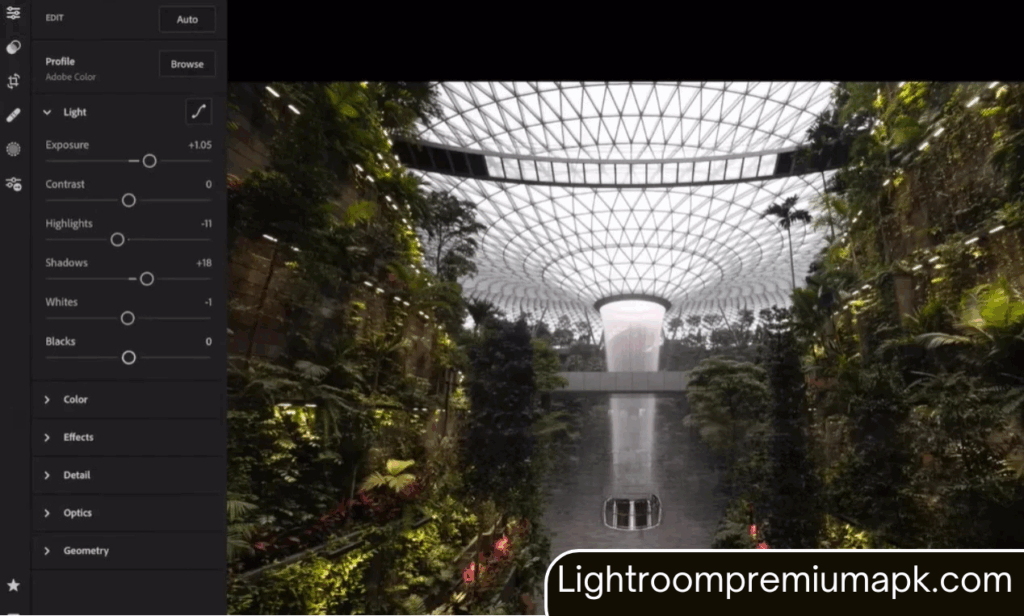
Both the photo editing software have distinct interface tools. Adobe Lightroom tools are displayed at the bottom of the settings, where all the options, such as image delete, share, and other info, are gathered at the top. On the other hand, Snapseed all the tools in the tool tab, and filters are in the style tab. The redo or undo the edit, and the ellipsis gives instructions and tutorials on changing the settings.
Lightroom Interface
- Library: As the name shows, it is the central hub for process organizing and managing the photos. With the help of the Library, users can create image collections with metadata to quickly locate and organize photos.
- Develop: It’s applied to adjust the detail in images. It offers advanced adjusting color and balance brightening features perfect for professional photography.
- Slider: There are extensive slides set in Lightroom for exposures, brightness, background color, balance tools to control photo editing, and other details.
Snapseed Interface
The Snapseed simplified approach only applies to mobile phones, and the interface tools are mobile-friendly. Here, the Snapseed interface tools and design are discussed for a better user experience:
- You will see the main interface when downloading and opening the Snapseed application.
- Import photos: It is used to create a new image in Snapseed software, click the “+” key to import the image from Gallery or take a new one.
- Tools Tab: It includes editing features such as cropping, healing, selective editing, and brushes.
- Style: It includes presets and filters to edit the photos quickly.
- Export: Use to save the images or directly store them on social media platforms.
- The effectiveness of Snapseed is that buttons are labeled, and the user can easily understand the features and functions. It makes the user workflow run smoothly.

Lightroom VS Snapseed: Editing
Text Tool: The Snapseed tool adds or removes text in various colors and styles. These tools also allow the user to customize the image according to their choice. Therefore, the text tool gives a unique look to photos and makes them more attractive. However, Lightroom can’t apply this to images.
Portrait: Sanpseed offers portrait editing with multiple features such as brightening, smoothness, contrast saturation, and more. However, Adobe Lightroom doesn’t allow extra tools. Therefore, Snapseed is a comparatively better option due to its portrait editing features.
Lightroom VS Snapseed: Selective editing
Selecting editing features is available in both applications. Snapseed offers basic editing, while Lightroom gives advanced editing features in the paid version. The pro version includes advanced radial, adjustment brush, and gradient filter to edit the selective point in the image.
Snapseed selective editing free features are best for newbie photographers. Just click on the image face and tap on the control. You can adjust the slider brightness to an upward point. The background will remain the same to ensure the attentional point in the image. It’s best to get experience and choose a pro version for advanced tools.
Lightroom VS Snapseed: Photo Enlargement
Snapseed offers image resize and enhancement options. Users can easily resize the image for different social media platforms. For instance, if you want to resize the image for an Instagram post, you can quickly add a white border to it. The expansion tool can adjust your image’s plain areas and smooth adjustment to give a more prominent outlook to your photography.
Lightroom VS Snapseed: Sharpness and Masking Tools
Both software offers features for image sharpness and masking tools, however, Lightroom offers more advanced sharping features. Users can enhance images by applying sharpness and a masking tool. This provides users control over sharpness adjustments. It produces more attractive photos according to the user’s needs.
On the other hand, Snapseed only offers essential sharpness and masking features. Users can apply the sharpness tools of the selected photos. It can be difficult for professional photographers to use limited sharpness and masking and less control over it. Thus, the professional photographer opts for Lightroom’s advanced features of masking and sharpness for its adjustment.
Dehaze Tool
The Dehaze tool is only available in the Lightroom app, and it has the most advanced features that create clarity in photos and give a unique, attractive look. It is perfect for features like sky and landscape to add natural and atmospheric views. This tool is best for outdoor and natural photography lovers.
HSL Tool
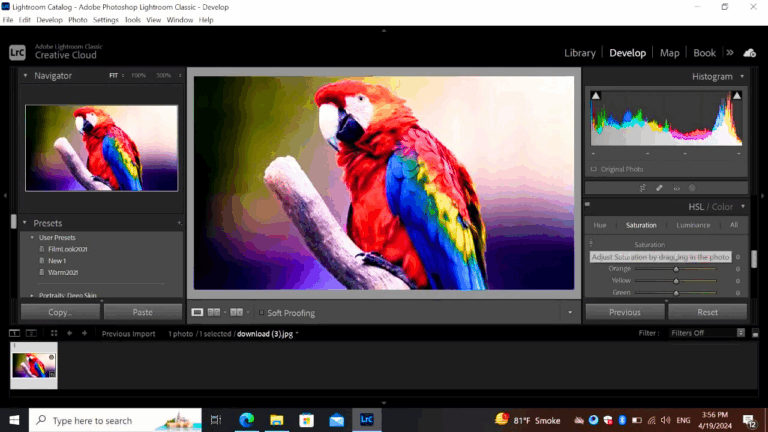
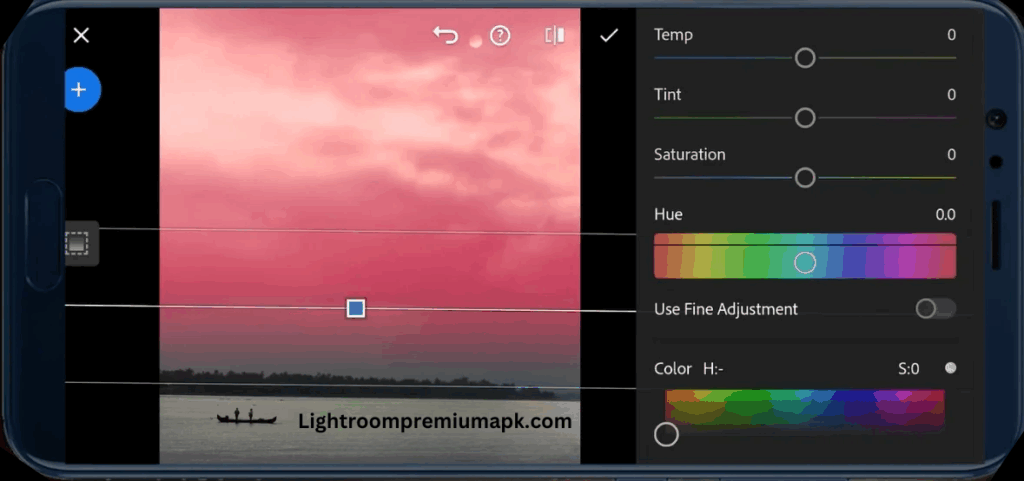
HSL is another unique feature only available in Lightroom and describes feature differences between Lightroom and Snapseed. With the support of this tool, users can adjust Hue, Color, Saturation, and Luminance by using sliders. Users can apply eight colors, red, orange, blue, yellow, magenta, purple, and green aqua, for specific fine-tuning of images.
Users can transform a particular color with the help of the Lightroom HSL tool. Only select any color in the tool and change the specific part or whole image color. This advanced color control feature makes the Lightroom more unique and gets the attention of photographers for stomized editing.
Color Grading
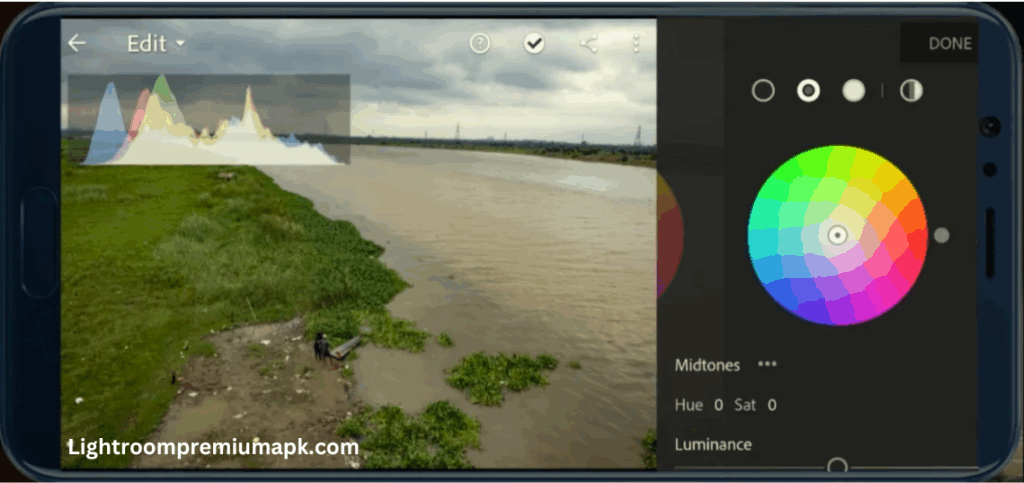
Color grading is the most required tool in editing, and both apps offer it. Snapseed gives limited color adjustment features that are easy to apply but it’s not enough for a professional photo editor. Adobe Lightroom provides advanced color adjustment features to enhance photo quality smoothly.
Lightroom offers extensive color grading control over highlights, shadows, and mid-tones by individually adjusting all these corrections to achieve a vibrant look. It is located in the interface with a circular color-shape grading icon. Here, users can quickly select any color they choose for editing images. Its cool feature attracts professionals to adopt the software for color customization.
Lightroom VS Snapseed: Presets
We know that preset gives perfect results with minimum time and effort. It’s a game-changer for professional photo editing. Adobe Lightroom app offers free and paid preset collections to get specific styles without manually applying them to images. Both software have preset functionalities but with a different workflow.
Adobe Lightroom is popular for its large built-in Preset Library. It includes multiple designs and looks that provide flexibility to photographers to apply customized designs to pursue the best outcomes. It also allows importing third-party presets to increase creativity that’s why this app is most favorite in the photographic industry.
In contrast, Snapseed offers a limited preset collection but provides more accuracy and control. It’s preferred by photographers who are interested in fine-tuning each image with customization and detail editing. It’s perfect for beginner photographers who are in the learning phase of basic editing skills.
Thus, choosing a photo editing app depends on users experience level and result requirements. For instance, an expert photographer interested in various designs and the ability to have a wide range of workflow. Then definitely you will follow Lightroom. But, if you prefer personal customization, and detail adjustment to widely explore this field, Snapseed is the suitable choice.
Lightroom Vs Snapseed: Ease Of Use
Ease of use depends on individual expertise and photo editing skills. Adobe Lightroom has advanced editing features such as different color adjustments, presets, organizing images in the library, photo managing tools, and more. Offering a wide range of features, tutorials, and guidelines, as well as a user-friendly interface, is helpful in editing. It’s the first choice of professional photographers.
On the other hand, Snapseed offers a simple and user-friendly interface that is not complex and free. Thus, users prefer it, specifically newbies or those who like to do flexible and basic editing. Snapseed automatic editing feature makes it more interesting for photographers to enjoy hand-off tools.
Lightroom VS Snapseed: File Type
Both of these software support different file formats to import or export images in the app for photo editing. The Lightroom allows multiple formats such as JPEG, TIFF, and Raw files. Therefore, it is a perfect choice for professional editors. The app also provides flexibility for files transferring in any form to fulfill the editing demand.
On the other hand, Snapseed only provides the JPEG format preferred software for professional photographers. However, it’s suitable for editing mobile users and social media posts because it captures minimum data storage. Thus, this is perfect for mobile users as it doesn’t have a larger data storage capacity than a desktop.
Lightroom Vs Snapseed: Pricing
Pricing is the main cause that comes to mind when buying an application according to the budget. Adobe offers two different prices for Lightroom CC and Lightroom Classic. The CC version is for mobile and tablet users. Its monthly subscription is $9.99. The Classic version is for desktop users, and its monthly subscription is 19.99 $ along with the Photoshop app.
Lightroom is best for industrial photography investment. Thus, it’s a wise investment for professional demand. Conversely, Snapseed offers full free editing tools. Users can benefit from freely installing and applying without any resistance. It’s the best option for beginners to adopt at the beginning of their careers.
The Snapseed is a suitable choice to practice without investing money and preparing for the professional field. However, it offers basic tools suitable for casual photography and non-professional photography. Due to its cost-effective contributions, this application is popular among the users.
Lightroom VS Snapseed Pros and Cons
Lightroom Pros and Cons
Pros
- Offer advanced editing tools to fine-tune the multiple issues in editing, such as color, balance, exposure sharpness, etc.
- Maintain the image’s original quality with a non-destructive editing process.
- Offer professional tools such as color grading, lens correction, and color adjustment.
- Powerful image organizing and management system by applying keywords, ratings, or metadata to search and access the image within seconds.
Cons
- Its desktop system heavily applies powerful processing, memory, and storage to work consistently.
- Lightroom offers advanced features on subscription.
- Users must subscribe to the Adobe Cloud Creative version to access the advanced tools.
Snapseed Pros and Cons
Pros
- Offers a user-friendly interface perfect for easy newbies to apply the tools without any prior experience.
- Simple and easy editing tools allow users to continue the work without resistance smoothly.
- Offers non-destructive editing tools to maintain the image’s original quality and make the photos more attractive with natural quality.
- Free; users don’t need to subscribe.
- Its touching gesture allows one to edit effortlessly to adjust and use the various effects on images.
Cons
- Basic and limited editing features are available and not applicable to desktops and laptops.
- It is not suitable for professional photographers due to its mobile-friendly features.
- The limited functionality of the app will not fulfill the photo editing requirements.
- It is not a perfect editing app for technical or creative editing projects due to lack of advanced features.
Conclusion and Recommendations
While comparing Lightroom and Snapseed in the above article, we have tried to answer which application is best for editing depending on the user’s demands. Hope that readers will clearly understand both apps’ distinctive features and that both of these are best for editing requirements. The Lightroom fulfills professional and expert photographers’ needs. It provides advanced tools with unlimited presets, Raw files, and editing tools.
Lightroom offers advanced tools and features. It professionally covers the editing, but It seems complicated for newbies to apply in the first place. However, once you experience it, you will adopt Lightroom. Professional photographers mostly use Adobe Lightroom in the editing process.
On the other hand, occasionally use Snapseed depending on the user’s needs, experience level, and skills. Snapseed is for beginner photographers. Those who want to apply a user-friendly and simple interface or can’t afford the expensive application should use Snapseed free of cost and easy to use.